free mac app · open source
 Burst Control
Turtle Beach Burst II Air software for Mac.
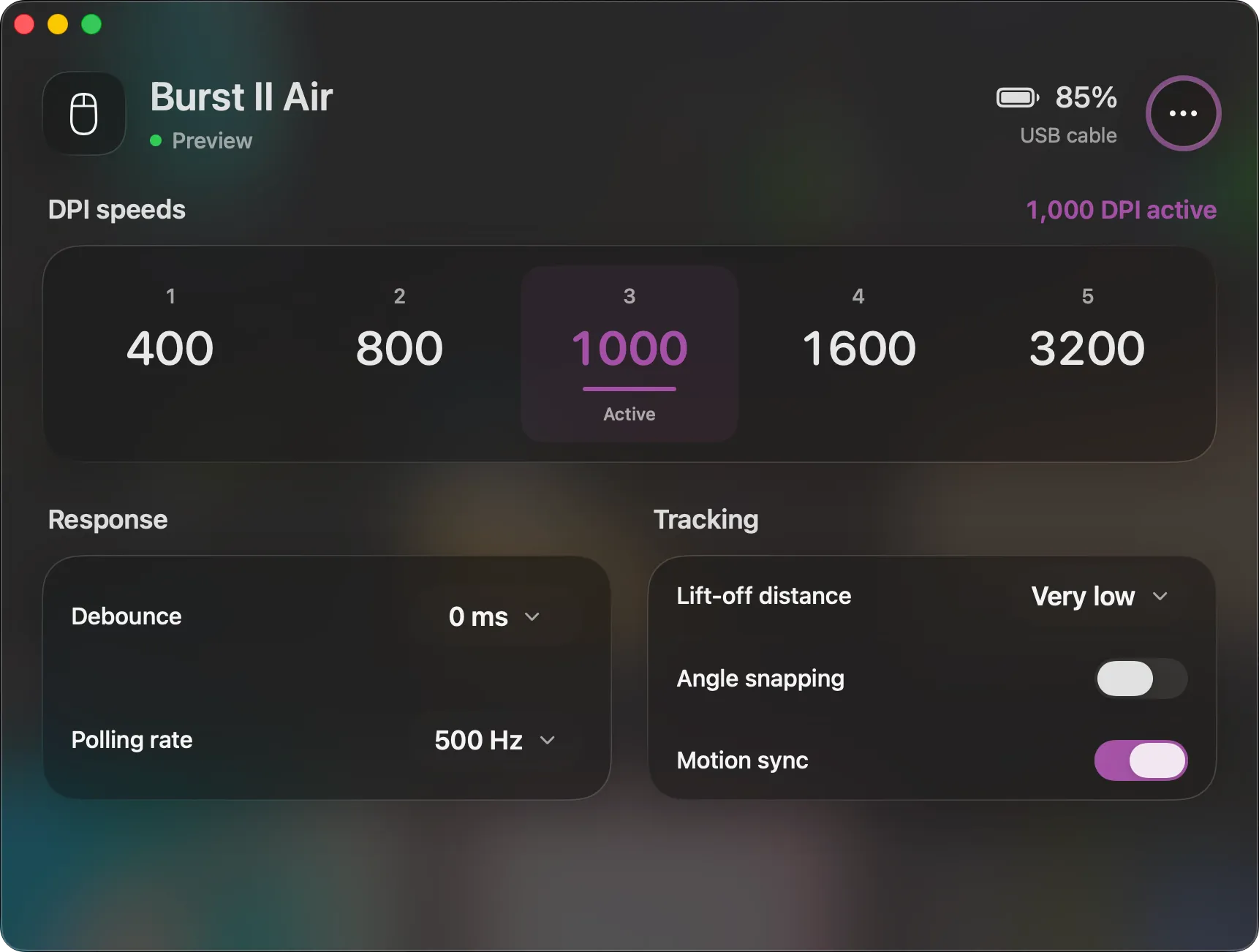
Change the DPI, polling rate, debounce and tracking settings of the Burst II Air (also sold as Burst 2 Air) on macOS, and see its battery level. It talks to the mouse directly over the 2.4 GHz receiver or the USB cable. No Windows PC or virtual machine needed.
download for mac ↗ source on github ↗
v0.2.0 · macOS 13+ · Apple silicon · signed and notarized by Apple · MIT license
What you can change
- DPI
- All five DPI stages, from 50 to 26,000 DPI in steps of 50. The stage you're on is highlighted as you press the mouse's DPI button.
- Polling rate
- 125, 250, 500 or 1,000 Hz.
- Debounce
- 0 to 10 ms.
- Tracking
- Lift-off distance, angle snapping and motion sync.
- Battery
- Battery percentage, charging state and whether the mouse is on the receiver or the cable.
- Safe writes
- Changes stay a draft until you click Apply. The app backs up the current settings before writing and reads them back afterwards to check they were stored.
Install
With Homebrew:
brew install --cask artyomkulimov/tap/burst-controlOr by hand:
-
Download the
.zipfrom the latest release on GitHub, unzip it and move Burst Control to Applications. - Open it, then turn it on under System Settings → Privacy & Security → Input Monitoring, and reopen the app.
- Plug in the USB cable, or connect the receiver and switch the mouse to 2.4 GHz. The settings load automatically.
To build from source you need macOS 13 or later and Apple's Command Line Tools; the steps are in the README.
Compatibility
| Connection | USB ID | Status |
|---|---|---|
| USB cable | 10f5:5002 | Supported |
| 2.4 GHz receiver | 10f5:5004 | Supported (battery over the receiver not yet confirmed) |
| Bluetooth | – | Not supported |
Tested on an Apple silicon Mac. It configures the mouse's active onboard profile and supports one mouse per connection type.
How it works
The mouse stores its own settings; on Windows, Turtle Beach's Swarm II
software sends the USB commands that change them. I took the Burst II Air
module from Swarm II (BURST_II_AIR.dll), read its
machine code to find each setting's handler and the commands it sends,
then rebuilt the protocol with macOS HID feature reports in Swift and
checked every mapping on the real mouse. The firmware is never modified.
The full write-up covers device discovery, the 64-byte packet format and checksum, the settings blocks, battery fields and the differences between cable and receiver: reverse-engineering walkthrough.
FAQ
Is there Turtle Beach Burst II Air software for Mac?
Yes. Burst Control is a free, open-source Mac app for the Burst II Air (also written Burst 2 Air). It changes the mouse's DPI stages, polling rate, debounce, lift-off distance, angle snapping and motion sync, and shows its battery level, without a Windows PC.
Can I install it with Homebrew?
Yes: brew install --cask artyomkulimov/tap/burst-control. Homebrew downloads the same signed and notarized release as the GitHub download.
How do I change the DPI of the Burst II Air on a Mac?
Install Burst Control, allow it under Input Monitoring, then plug in the mouse or its receiver. Click any of the five DPI numbers, type a value between 50 and 26,000, and click Apply.
Do I still need Swarm II?
Not for the settings listed here. Swarm II is Turtle Beach's own configuration software. Burst Control speaks the same USB protocol from macOS, so you don't need a Windows PC or a virtual machine to change them.
Does it work wirelessly?
Yes, through the 2.4 GHz USB receiver as well as the USB cable. When both are connected, the cable is used. Bluetooth is not supported.
Which Macs does it run on?
macOS 13 Ventura or later. The signed release is built for Apple silicon (M1 and newer); there is no Intel build yet.
Why does it ask for Input Monitoring?
On this mouse the settings channel shares a USB interface with mouse input, so macOS only opens it to apps with Input Monitoring. Burst Control doesn't record movement or keystrokes and doesn't generate input.
Do I need to keep the app running?
No. Settings are written to the mouse's active onboard profile, so you can quit the app after clicking Apply. There is no background helper.
Is it safe? Is it official?
It's an independent project, not made or endorsed by Turtle Beach. It never flashes firmware, keeps settings it doesn't understand as they are, and backs up your current settings before every write.
What can't it do yet?
Switching onboard profiles, button remapping, macros, surface calibration and sleep settings. Bug reports and hardware reports are welcome on GitHub.
Burst Control is made by Artyom Kulimov. It is an independent project, not affiliated with or endorsed by Turtle Beach. Released under the MIT license. Last updated .